
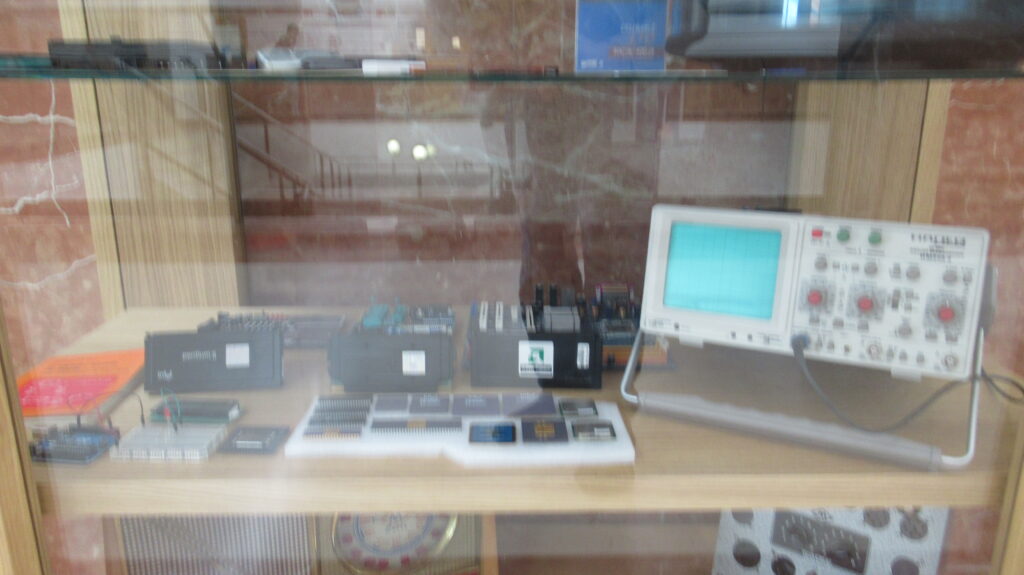
This display case is dedicated to hardware. You’ll find webcams, graphics cards, various storage systems (including a giant hard drive), microprocessors, electronic components, an oscilloscope, several multimeters, and a 1950s vacuum tube radio.
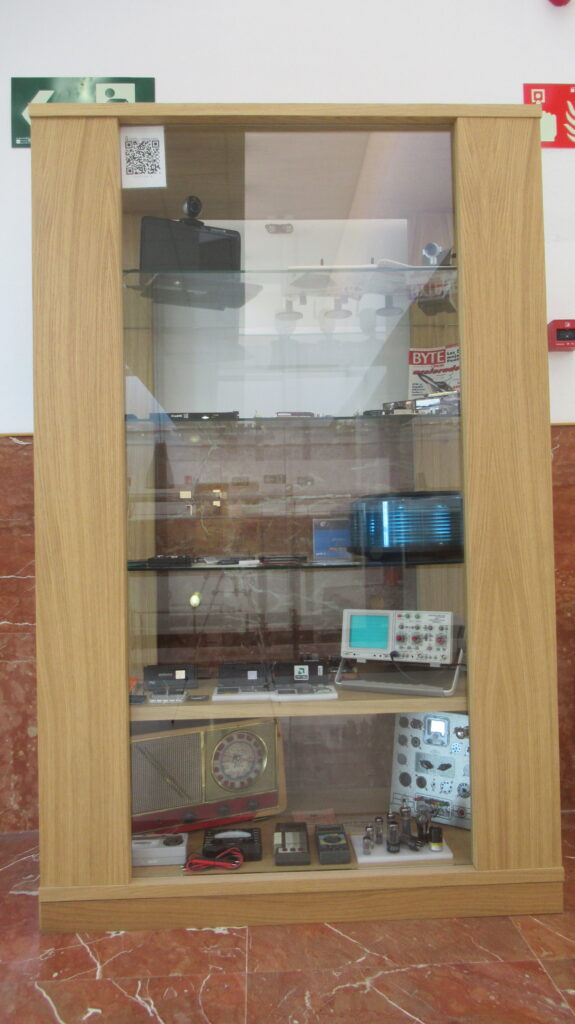
On the top shelf, we have several examples of webcams. On the mini-laptop to the left, an Acer Aspire One (2009), we’ve connected a Logitech QuickCam Communicate STX (2007), which has a cover that can be opened or closed. In the centre-right section of the shelf, we find a set of three Axis Communications webcams (2009), two wireless and one wired. On the far right, we have a Linksys WVC54G wireless camera (2004).
In the centre of the shelf, we’ve opened issue number 5 of “Byte” magazine (March 1995) to an article on “Face Recognition.” The proliferation of cameras in all kinds of public spaces has fostered the development of face recognition algorithms, which can identify or verify the identity of people present in a scene. Face recognition is just one of the many modalities of biometrics, the discipline within artificial intelligence that uses automated procedures to recognize people by their physical features (face, fingerprint, iris, palm print, etc.) or behavioural traits (voice, gait, signature, etc.).
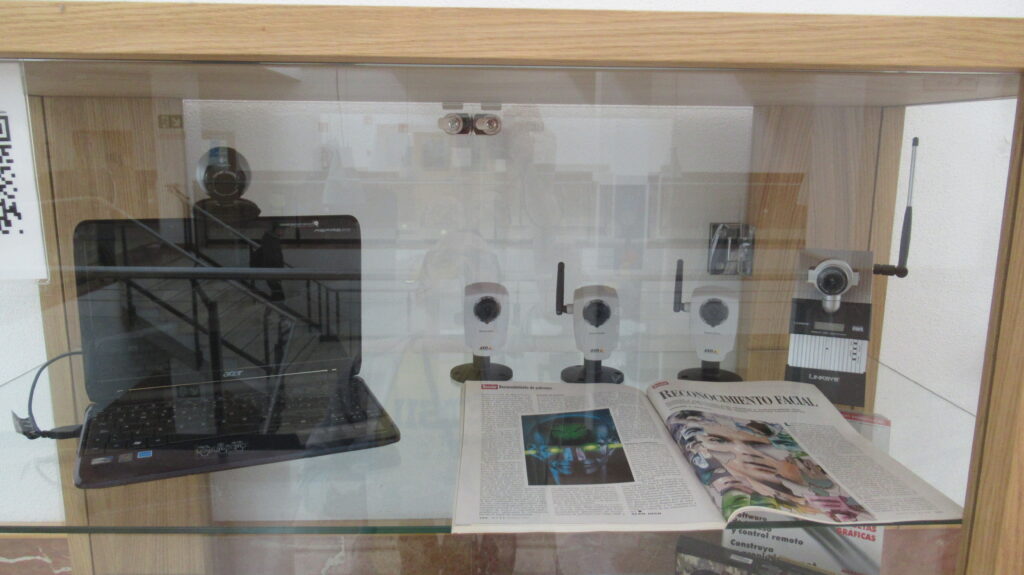
On the second shelf from the top, we can see up to 14 graphics cards or GPUs of varying quality, some more modest and others geared towards the gaming world. As computers require increasingly complex and rapid calculations to generate video game graphics, the cards generate more heat, requiring increasingly larger fans or heat sinks.
In the right-hand corner, positioned sideways, we can see the NVIDIA GeForce GTX 260 (2008) graphics card, geared towards gaming enthusiasts. It features 192 processing cores and PCI Express 2.0 bus technology. As an interesting detail, one side displays a whimsical illustration of an Eastern warrior.
Next to the card mentioned above, leaning against the glass, we can find issue number 51 of the magazine “Byte” (May 1999), with a cover entitled “3D Accelerators: The Latest Generation of Graphics Cards”.
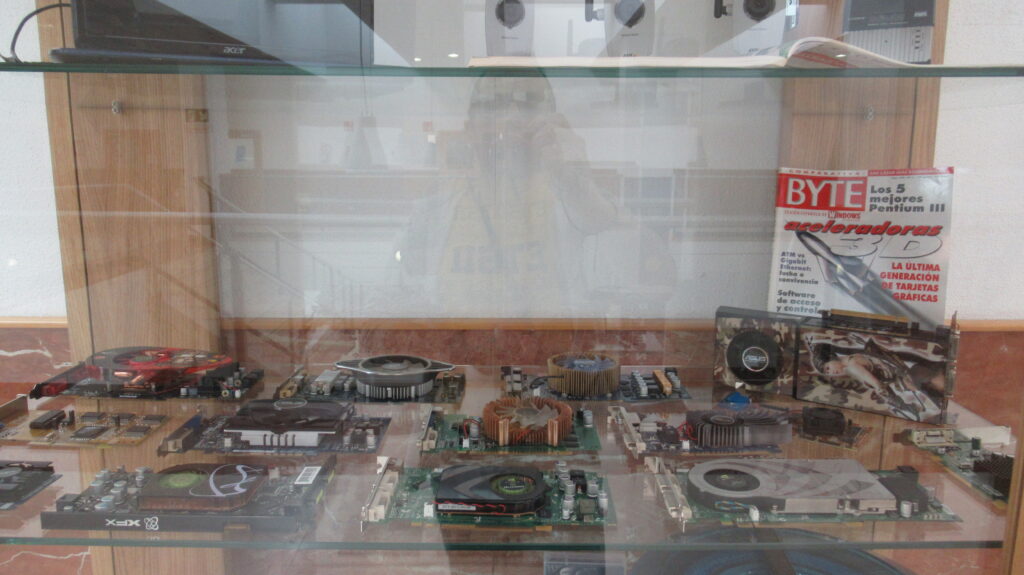
The third shelf from the top is dedicated to different memory or storage systems. To begin with, on the front we can find punched cards, a paper-based system in which holes or no holes are marked to indicate zeros and ones.
They have 80 columns of 10 positions, enough to store a 100-letter phrase with spaces.
The above sentence could have been encoded on our punched cards and would have occupied exactly the necessary 100 bytes, since it contains exactly 100 characters, including spaces.
Also in the central area of the shelf, we find a magnetic core or ferrite core memory, which was used in computers until the early 1970s. Ferrites are rings of a ferromagnetic material, allowing them to maintain their magnetization continuously. Depending on the orientation of the magnetic field, they will be clockwise or counterclockwise, two positions that can also represent zeros and ones. Therefore, one ferrite stores 1 bit. To read the state of a ferrite, or to establish a specific magnetization direction, each ring is traversed by different conductors, so that the ferrites are “linked” together like jewels. These ferrites are placed in racks. Our memory organizes the ferrites in a 4×4 square arrangement, which in turn is composed of 16×16 cores, giving a total capacity of 512 bytes.
Ferrite memories are of great interest because they are the emblem of the computer profession, as demonstrated by the Resolution 2521 of the Undersecretary of the Spanish Ministry of Education and Science of January 26, 1978.
On the far left, we can find a reel of 3M Scotch Classic magnetic tape. It is 1800 feet (548.6 m) long, with a recording capacity of 45 minutes per direction at a speed of 7.5 IPS (inches per centimetre).
Other magnetic tapes on this shelf include the HP 88140SC, up to 16 MB, the HP DAT 72 (blue), up to 8 GB, and the Dell Ultrium 2 LTO (unopened), with a capacity of 400 GB.
Next to the Scotch tape, we find a hard drive without its outer casing. It’s a 3.5″ (8.9 cm) Western Digital WD3200JS, dated 2006, with a capacity of 320 GB. We can see that it consists of three double-sided magnetic platters, which are read by a read/write head that spans the entire width of the platters. The platters rotate at a speed of 7200 rpm (revolutions per minute).
At the bottom left corner, we find an 8-inch (20.3 cm) magnetic floppy disk. These types of disks began to be used in 1971. Specifically, this IBM Diskette 2 is double-sided, with a total of 74 data tracks, each with 15 sectors of 256 bytes. This gives a total of 568,320 bytes or 555 kB (using the convention 1 kB = 1024 bytes).
Next to this floppy disk, there’s another 5 1/4″ (13.3 cm) 3M floppy disk (1989), double-sided and double-density, giving it a capacity of around 500 kB. We can also find a 3 1/2″ (8.9 cm) 3M floppy disk (1996), this time double-sided and high-density, giving it a capacity of 1.44 MB (where 1 MB = 1024 kB, although the notation is confusing). This 3 1/2″ floppy disk is the one that gave us the “Save” icon, which we can find in all kinds of applications. In display case 4, you can find boxes of 3M floppy disks in 5 1/4″ and 3 1/2″ sizes.
Let us also remember that in display case 3 you can see 3″ floppy disks specifically for Amstrad computers.
Next to the 3.5″ floppy disk, you can see a ZIP 100 disk, manufactured by Iomega (1994). It is called that because it provides a capacity of 100 MB, although it is incompatible with 3.5″ floppy disks, despite being of similar size.
Also from Iomega, we find a Bernoulli floppy disk (1994), with a capacity of 230 MB. Located at the back in the central part of the shelf, we can recognize it because it looks like a giant 3 1/2″ floppy disk.
On top of the punched cards, we found three USB flash drives. These are a Sharkoon (128 MB) and a Sony Micro Vault (256 MB), both from 2003. The other is a Kingston DataTraveler G4 (32 GB) from 2020.
Now we move on to optical discs. First, we have a miniCD-ROM, 8 cm in diameter. Next, we have a standard-sized CD-ROM (12 cm in diameter), a CD-R type, with a capacity of about 700 MB. Finally, we have a DVD-R, also 12 cm in diameter, with a capacity of 4.7 GB.
To finish this shelf, on the right-hand side, we can see another of the most exotic objects in our collection. It’s a blue Storage Master 883-91 removable disk pack from the manufacturer Control Data (1974). It measures 14 inches (35.6 cm) and has a capacity of 300 MB. Although it was made up of 12 platters, the top and bottom ones were only there for protection. It has a handy handle for easy removal and transport (it’s quite heavy). These types of disks required a drive that was about the size of a top-loading washing machine.
Interestingly, right in front of the disc pack are two memory cards. One is a 512 MB Agfa Digital Film SD card from the 2000s. The smaller one is a 2 GB microSD card from the 2010s. Compared to the disc pack, they’re tiny, but they store infinitely more data!
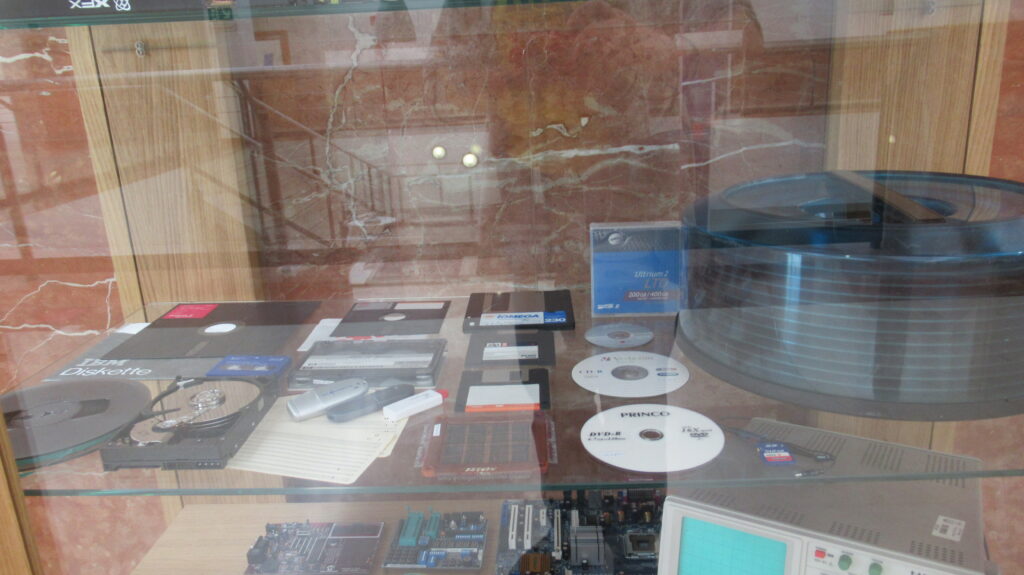
On the second shelf from the bottom, starting from the left, we find a copy of the book “Boolean Binary Algebra and its Applications to Computer Science” by Raoul de Palma (1981). Although Boolean algebra was invented by George Boole in 1847 as a theoretical study of logic, with the advent of the first computers it became clear that it could be applied to the emerging disciplines: digital electronics in general, and computer science in particular. Without Boolean algebra, the processors that control computers would not exist, and therefore, to a greater or lesser extent, it is part of all the degrees offered by our School.
However, the main attraction of this shelf is the collection of processors on display. Until 1971, computers were built with discrete components (transistors, resistors, capacitors, etc.). On November 15, 1971, Intel produced the first integrated circuit, or chip, that included the entire central processing unit (CPU). This was the Intel 4004, a 4-bit processor primarily intended for calculators. In mid-1972, the Intel 8008 appeared on the market, ushering in the 8-bit processor generation. A couple of years later, an improved version, the Intel 8080, was released, which would be used, for example, in the Altair 8800 computer. We do not have any of these processors on display.
Starting with the 8080, 8-bit processors from manufacturers other than Intel began to appear. In our collection (centre of the shelf), we have a Motorola 6800 from 1974 (yes, Motorola made processors before they made phones). It’s characterized by a dual-in-line package (DIP) with 40 pins (20 on each side), a gold colour, and a ceramic cover. This processor was used, for example, in the Altair 680 computer.
An 8-bit processor with somewhat greater commercial success was the 6502 from MOS Technology (1975). This chip also had 40 pins, like the 6800, although it was incompatible. It was the processor chosen for Apple’s first computers (the Apple I, Apple II, and Apple IIe), as well as the Commodore VIC-20. A variant of the 6502 was also used in the Commodore 64 computer and the Atari 2600 and Nintendo Entertainment System (NES) video game consoles. These are just a few examples of its use in real machines. As a side note, the MOS 6502 is also the processor used by the fictional character Bender, the robot from the Futurama series. The specific 6502 chip we have in our Museum has the Commodore logo printed on it, suggesting that it came from a VIC-20.
In 1976, Zilog released the Z80 processor, designed for software compatibility with the Intel 8080. The Z80 was the processor of choice for Sinclair computers (ZX81, ZX Spectrum, Spectrum+) and Amstrad computers (CPC 464, CPC 664, CPC 6128). It was also used in the Spanish Computec S/1 computer. A variant of the Z80 was used in the Canon V-20 (MSX computer).
In 1979, Motorola added another zero to the 6800 and released the Motorola 68000, named for the approximate number of transistors on the chip. This hybrid processor handled 16-bit data and 24-bit addresses, making it significantly more powerful than its predecessors. This is evident in its size: the package is longer, with a total of 64 pins (32 on each side), also gold-plated like its smaller sibling. Its improved computing capabilities led to its selection for several renowned computers, such as the Commodore Amiga and the Apple Macintosh 128K, as well as the Sega Mega Drive video game console.
A little before the Motorola 68000, in 1978, Intel took a step forward with its own processors, with the arrival of the Intel 8088 (8-bit, not available in our collection) and the Intel 8086 (16-bit), which began to be used in IBM PCs and clones. The 8086 marks the beginning of a generation of processors called Intel x86, which continues to this day. The Core i5 or i7 processor in your laptop is a descendant of that early 8086. The 8086’s packaging is also a dual-row, 40-pin design, just like the 8080 and earlier processors, so next to the 68000, it looks like an inferior model.
In 1982, Intel released the 80286, colloquially known as the 286. This processor featured a change in packaging, now a square format (PGA, or pin grid array), with 68 pins. It remained a 16-bit processor, an improved version of the 8086.
Three years later, the Intel 80386 (or simply 386) appeared, the first processor in the 32-bit x86 family. Like its predecessor, it was packaged in a PGA package, this time with 132 pins.
Leaving the x86 family aside for a moment, we also have a MIPS 2000 processor, specifically a Performance PACE MIPS PR2000A-16PGC. This is a 32-bit processor, also from 1985, with a total of 145 pins. This processor is frequently taught for educational purposes. Variants of the MIPS have been used in different video game consoles, such as the Nintendo 64, the Sony PlayStation, and the Sony PlayStation 2. These processors were also chosen for high-performance servers from Silicon Graphics, such as the O2 and the Octane. As an interesting side note, one processor from the MIPS family has traveled further than any other: the Mongoose-V (a version of the MIPS 3000) traveled aboard NASA’s New Horizons probe and flew past Pluto in July 2015.
Returning to the history of the x86 family, after the 386 in 1989 came the Intel 80486 (or 486). It has a PGA package with 168 pins.
In short, up to this point, Intel processors were numbered (8086, 286, 386, 486, etc.). Soon, a competitor emerged: AMD. AMD released its own versions of Intel processors and maintained the numbering system to avoid confusion among users. This obviously displeased Intel. Upon realizing that numbers could not be trademarked, Intel decided not to number its next processor the 586, but instead invented a word for it: Pentium. The Intel Pentium appeared on the market in 1993 and retained the PGA form factor, with a total of 273 pins.
The Pentium was accompanied by a massive advertising campaign. However, this processor was also famous for a manufacturing defect that caused errors in some arithmetic calculations, specifically floating-point divisions. Initially, Intel concealed the problem until Thomas R. Nicely, a mathematics professor at Lynchburg University (USA), discovered it in 1994 and published it on his website. At that time, the internet was in its infancy, and social media and blogs didn’t exist, so the news took time to spread. But it did. It even appeared in the Spanish press, as this article from the ABC newspaper on December 14, 1994, demonstrates. Intel’s reaction was to deny the error. Then they acknowledged it but downplayed its impact (only scientific users would be affected, not the average user). Finally, in December 1994, they had to admit the error and replace the defective chips. By then, the company’s losses were in the millions.
A new chapter in the history of Intel x86. Around the same time the Intel Pentium was released, a consortium of companies—Apple, IBM, and Motorola (the AIM Alliance)—created a new 32-bit processor called the PowerPC 601. Being a new design, they opted to maintain the square packaging, but this time the pins were distributed along all four sides, not beneath the flat surface. The PowerPC family of processors was used in Apple computers until 2006. Some variants were also used in video game consoles, such as the Nintendo GameCube, the Xbox 360, and the Sony PlayStation 3.
Following the original Pentium, an improved version with “MMX technology” was released (1997). These Pentium MMX processors, now error-free in divisions, allowed parallel processing that accelerated access to multiple data using a single instruction (SIMD, single instruction multiple data).
At this point in history, a significant change occurred in processor design. Intel abandoned PGA packaging and in 1997 chose a Single Edge Contact Cartridge (SECC) for the Pentium II. This meant that, for the first time, the processor was mounted perpendicular to the motherboard. This format was also used in the Pentium III (1999), and even by its competitor AMD with its Athlon K7 700 (1999).
In 2000, Intel released the Pentium 4. Not only did it abandon the Roman numerals of its two immediate predecessors, returning to Arabic numerals, but it also abandoned the cartridge format in favor of PGA packaging, this time with 478 pins.
After the Pentium 4, other processors arrived, such as the Pentium M and the Pentium Dual-Core (not shown), before moving on to the Intel Core family in 2006. We have an example from this family: a Core 2 Duo E6750 (2007). Interestingly, this processor doesn’t have pins, unlike its predecessors, but rather contacts (a total of 775). The motherboard socket has the pins (LGA, land grid array). This makes it more difficult for a pin to bend when trying to fit the processor into the socket.
We’ll finally leave the processors behind and move on to the rest of the items on this shelf. We have several boards. On the front left, we find an Arduino Uno with a simple circuit mounted on a breadboard. Next to it is a 16×2 LCD screen (16 characters in 2 rows).
At the back of the shelf, from left to right, there’s a Microchip Picdem 2 Plus Demo Board (2002), next to another board from SBC Technologies with a Microchip PIC 16F877A-I/P processor. We can also find a Conroe Presler Dual Core CPU motherboard for a computer. This board uses an Intel Core 2 Duo processor, which is not connected.
Finally, on the right side, we find a Hameg HM303-6 (2001) analog oscilloscope. Electrical signals can be displayed using a screen and two channels.
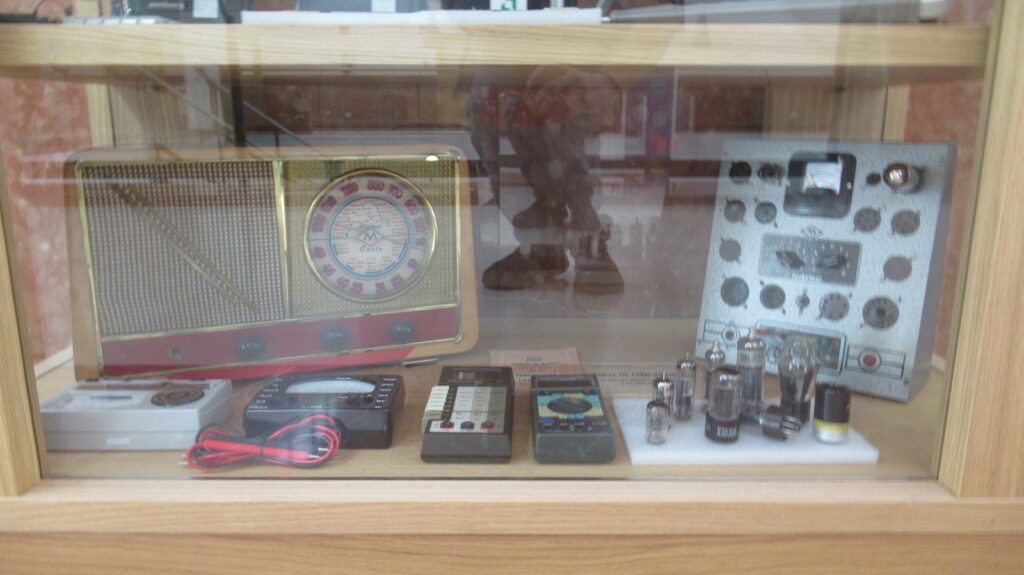
On the bottom shelf, on the left, we find what is perhaps the oldest item in our collection. It is a vacuum tube radio, estimated to date from around 1958. It belongs to the correspondence radio course of the Maymó Radio School in Barcelona, which was very successful in our country during the 1940s, 50s, and mid-60s.
On the right side of the shelf, we see several vacuum tubes of different sizes and shapes. One of them even has the IBM logo printed on it. Vacuum tubes are electronic components invented in the early 20th century that control the movement of electrons in an electric current. This allows them to amplify or switch (interrupt or change the direction) a signal. They were in use until the arrival of transistors in the late 1940s. They were used in both radios and early computers, which is why we’re displaying them here.
Next to the tubes, we find a Maymó tube tester, which has a series of connectors, each for a specific type of vacuum tube. This device allows us to verify the correct operation of these electronic components. As an example, we have connected a tube to one of the connectors. Between the radio and the tester, we can see a couple of auxiliary documents: the “Tube Tester Table” and a booklet with the characteristics of American and European tubes and their equivalents.
To conclude, on the front left of this shelf, we have four examples of multimeters—also known as volt-ohm-milliammeters (VOMs). These devices measure basic electrical properties such as current, voltage, resistance, and capacitance, among others. Two of the multimeters shown here are analog models, characterized by a panel where a needle moves to indicate the reading. The panel features multiple scales depending on the specific quantity being measured. The other two multimeters are digital, featuring an LCD screen that displays measurements using characters and numbers.
The leftmost multimeter is a Normatest 1811—an analog model dating to approximately 1966. Next to it is another analog multimeter, the Metrix MX 462 F, from around 1974.
The next multimeter is a digital model, the Data Precision 935, likely from the 1980s. It is distinguished by buttons on the left side that allow the user to select the appropriate measurement scale. Finally, the fourth multimeter—also digital—is an Escort EDM-168, which uses a rotary dial to set the scale. Its estimated date of manufacture is also in the 1980s. Interestingly, this Escort belonged to the product line distributed by Ataio Instrumentos—the same company associated with the PC in display case 4—as evidenced by the documentation in our possession.
Below, we list the detailed contents of each shelf in this display case:
| * Acer Aspire One laptop * Logitech QuickCam Communicate STX webcam * Set of 3 webcams (models 207W and 207) from Axis Communications * Linksys Wireless-G Internet Video Camera * “Byte” magazine (Issue 5, March 1995), open to an article on “Face Recognition” |
| * NVIDIA GF 7900GS Graphics Card * NVIDIA Quadro Graphics Card * NVIDIA EN7800GTX Graphics Card * NVIDIA GeForce GTX 260 Graphics Card * ASUS ENGT520 Graphics Card * ASUS EN9600GT Graphics Card * Sapphire Radeon HD 4850 Graphics Card * Graphics by Rage Mobility Graphics Card * Gigabyte GV-N610D3-1GI Graphics Card * Galaxy GF 9600GT Graphics Card * ATI Radeon HD 4870 Graphics Card * Point of View Graphics GF 9400GT R-VGA150915 Graphics Card * TopSearch TS-M-8V01C 94V-0 Graphics Card * VGA Video Card (unbranded) * “Byte” Magazine (issue 51, May 1999), with a cover titled “3D Accelerators: The Latest Generation of Graphics Cards” |
| * IBM 8″ Floppy Disk with Sleeve * 3M 5 1/4″ Floppy Disk with Sleeve * 3M 3 1/2″ Floppy Disk * Iomega Bernoulli Floppy Disk (230 MB) * Iomega ZIP 100 Floppy Disk (100 MB) * 3M Scotch Classic Magnetic Tape Reel * Western Digital Magnetic Hard Drive, without Cap (320 GB) * Single Magnetic Core or Ferrite Ring Memory Board (512 bytes) * Dell Ultrium 2 LTO Tape Cartridge, unopened (up to 400 GB of compressed data) * HP 88140SC 16-Track or Certified Data Cartridge (16 MB) * 8 cm Diameter CD-ROM (LG USB Drive Xtick Mini CD) * 12 cm Diameter Verbatim CD-R Type CD-ROM (700 MB) * 12 cm DVD Princo DVD-R type disc (4.7 GB) * Agfa Digital Film SD memory card (512 MB) * microSD memory card (2 GB) * HP DAT 72 tape cartridge * Sharkoon USB 2.0 flash drive (128 MB) * Sony Micro Vault USB 2.0 flash drive (256 MB) * Kingston DataTraveler G4 USB 3.0 flash drive (32 GB) * Three 80-column punched cards * Control Data Corporation 14″ removable disk pack (12 platters, 300 MB) |
| * Intel Pentium II processor cartridge * Arduino Uno with a breadboard containing a small circuit consisting of an LED and a resistor * AMD Athlon K7 700 processor cartridge * Intel Pentium III processor cartridge * Microchip Picdem 2 Plus Demo Board * SBC Technologies board with a Microchip PIC 16F877A-I/P processor * Assortment of processors: Motorola 6800, MOS Technology 6502, Zilog Z80, Intel 8086, Motorola 68000, Intel 286, Performance PACE MIPS PR2000A-16PGC, Intel 386, Intel 486, IBM PowerPC 601, Intel Pentium, Intel Pentium with MMX Technology, Intel Pentium 4, Intel Core 2 Duo * Conroe Presler Dual Core CPU motherboard (for an Intel Core 2 Duo processor, which is not in the socket) * Hameg analog oscilloscope HM303-6 * 16×2 LCD screen (2 rows with 16 characters each) * Book «Boolean Binary Algebra and its Applications to Computer Science» (Raoul de Palma) |
| * Vintage vacuum tube radio from the Maymó Radio School’s correspondence radio course * Normatest 1811 analog multimeter by Norma * Metrix MX 462 F analog multimeter with connecting cables * Data Precision 935 digital multimeter by Data Precision * Escort EDM-168 digital multimeter * Vacuum tube tester (with one tube connected), with the tester chart and booklet of American and European tube specifications and their equivalents from the Maymó Radio School’s correspondence radio course * Lot of 9 vacuum tubes of different sizes and shapes |